Hello World/Projects/
Views: -
Automating wordfeud
Summary
Tools used
Android studio for running wordfeud on my computer
Fiddler for mapping the private wordfeud API and debugging
Frida for disabling SSL-pinning and capturing secure network traffic from wordfeud
Method
Mapping the API
$ unxz frida-server-{version}-android-{architecture}.xz # Decompress the file
$ adb root # Request root privileges as it might be required later
$ adb push frida-server /data/local/tmp/ # Send file to device
$ adb shell "chmod 755 /data/local/tmp/frida-server" # Make the file executable
$ adb shell "/data/local/tmp/frida-server &" # Start the server
I now downloaded the SSL-pinner bypassing
script and injected it using the following command:
$ adb root # Request root privileges as it might be required later
$ adb push frida-server /data/local/tmp/ # Send file to device
$ adb shell "chmod 755 /data/local/tmp/frida-server" # Make the file executable
$ adb shell "/data/local/tmp/frida-server &" # Start the server
frida -U -f com.hbwares.wordfeud.free -l universal-android-ssl-check-bypass-2.js --no-pause
I could now start Fiddler and route all data traffic through it by setting it as my proxy. By using the requests module in
python I could send customized requests from there. Note that you first have to enable "Allow remote computers to connect" in Fiddlers settings and install Fiddlers custom SSL certificate in android studio by going to {computers local IP-address}:8888 and downloading it from there.
Action selection algorithm
Although this worked and the bot preformed quite well, the bot could sometimes get stuck with a rack of unplayable tiles. To counter this I added support for tile swapping in some cases. I also made the bot take some possible counter moves into consideration, as it would sometimes play a <20 point word that set the opponent up for a 200+ point word.
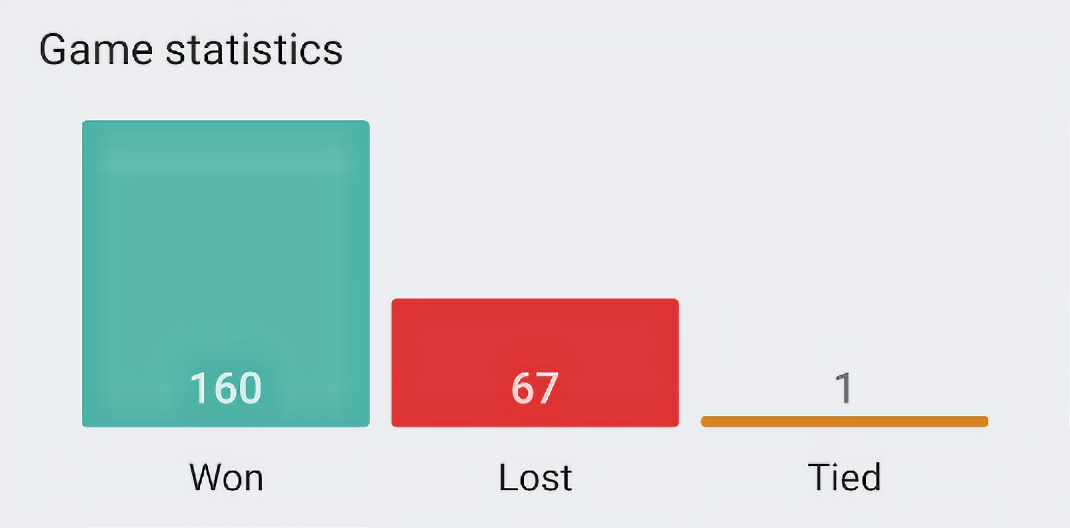
Here is an image of how it preforms after a few days of testing:
Other features
Game start --> "I'm back"
Bot plays high scoring word --> "He'll live."
Opponent plays high scoring word --> "Get out."
Bot victory --> "Hasta la vista, baby"
Opponent victory --> "I'll be back"
Random chat message --> "Talk to the hand."
Emoji only chat message --> "🤖"
Question mark in chat message --> "I am not authorized to answer your question."
Opponent congratulating bot in chat --> "I love you, too, sweetheart."
Although this may seem quite basic, this method often results in surprisingly natural conversations.
Some other things I added are:
- Automatically starting new games
- Automatically accepting incoming requests
- Built in swedish dictionary
- Console output with cool colors like gray and blue
Result
As I'm planning to keep the script running in the near future, you might encounter T-800 if you keep searching for new games in wordfeud.
The code can be downloaded here: